AI Crawlers, robots.txt and llms.txt: A Practical Access Guide
On this page
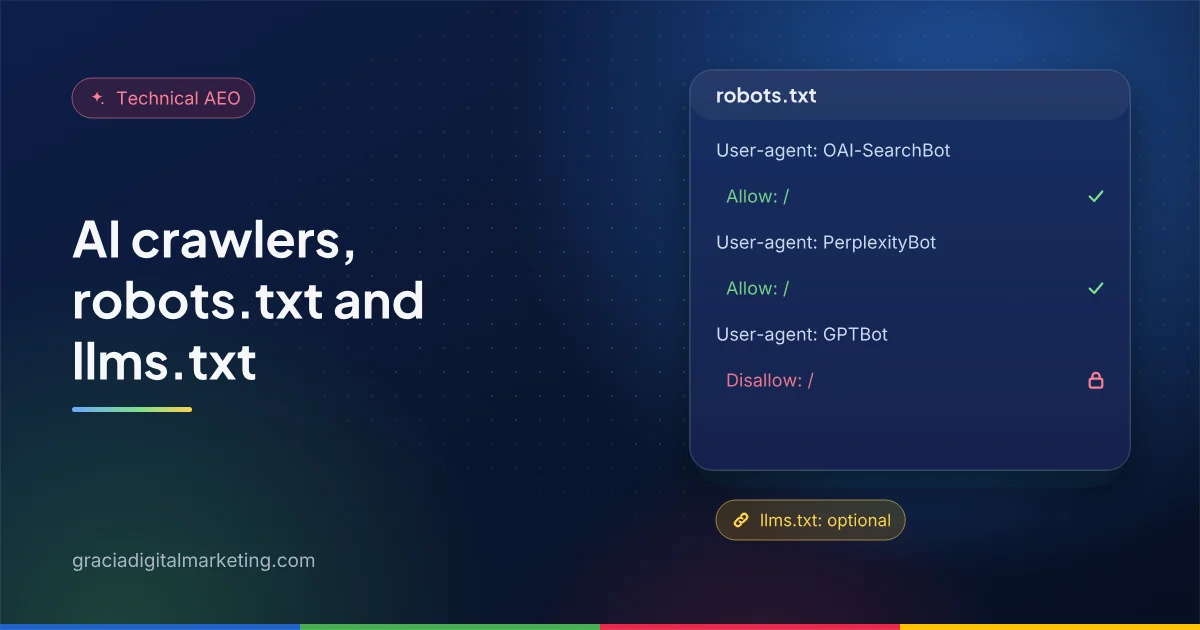
To control AI crawlers, separate three jobs in robots.txt: search crawlers that let AI assistants cite you (OAI-SearchBot, PerplexityBot, Claude-SearchBot, plus Googlebot and Bingbot), training crawlers (GPTBot, ClaudeBot and the Google-Extended token) and user-triggered fetchers. Allow the first group if you want AI visibility, decide the second deliberately, and treat llms.txt as optional.
Many sites copied a “block all AI bots” robots.txt in 2023 and 2024 and forgot about it. Others never checked whether their firewall was turning AI search crawlers away. Both can quietly remove a business from AI answers. This guide explains what each major agent does, according to the companies that run them, and how to set rules on purpose.
What types of AI crawlers are there?
There are three kinds: search crawlers that build an index for AI answers, training crawlers that collect content for model training, and user-triggered fetchers that visit a page because someone asked.
The distinction matters because blocking one does not block the others. Many providers now document them separately and let you choose for each.
What does each major AI crawler control?
| Agent (robots.txt token) | Operator | Purpose | Effect of blocking |
|---|---|---|---|
Googlebot |
Google Search, including AI Overviews and AI Mode | Pages drop out of Google Search entirely | |
Google-Extended |
A control token, not a crawler: Gemini model training and grounding in Gemini Apps and Vertex AI | No effect on Google Search inclusion or ranking | |
Bingbot |
Microsoft | Bing search, which also supports Copilot answers | Pages drop out of Bing and its AI answers |
OAI-SearchBot |
OpenAI | Surfacing websites in ChatGPT search | Not shown in ChatGPT search answers (may still appear as navigational links) |
GPTBot |
OpenAI | Content that may be used to train OpenAI’s foundation models | Signals content should not be used for training |
ChatGPT-User |
OpenAI | Visits triggered by user actions in ChatGPT | OpenAI says robots.txt rules may not apply |
PerplexityBot |
Perplexity | Surfacing and linking websites in Perplexity; not used for training foundation models | Not surfaced in Perplexity search results |
Perplexity-User |
Perplexity | Fetches pages to answer a user’s question | Perplexity says it generally ignores robots.txt |
ClaudeBot |
Anthropic | Collecting content that may contribute to model training | Future content excluded from training |
Claude-SearchBot |
Anthropic | Improving search results for Claude users | May reduce visibility in Claude’s search results |
Claude-User |
Anthropic | Fetches pages when a user asks Claude a question | Content cannot be retrieved for user queries |
OpenAI and Perplexity both say robots.txt changes can take about 24 hours to take effect in their systems. Anthropic says its bots honor robots.txt, support the non-standard Crawl-delay directive and need rules on every subdomain you want to cover.
What does a sensible robots.txt look like?
For most B2B companies that want AI visibility: allow all search agents, and make an explicit, documented choice about training agents.
Here is an example that allows search and AI search crawlers but opts out of model training. It is a starting point, not a recommendation for every business:
# Search and AI search: allowed (no rules needed beyond the default)
User-agent: *
Disallow: /wp-admin/
Allow: /wp-admin/admin-ajax.php

# Opt out of model training (a business decision)
User-agent: GPTBot
Disallow: /

User-agent: ClaudeBot
Disallow: /

User-agent: Google-Extended
Disallow: /

Sitemap: https://www.example.com/sitemap_index.xml
Think carefully before copying the Google-Extended rule. Because it also covers grounding in Gemini Apps, blocking it may reduce how your content is used in Gemini answers. Some companies want their expertise in training data so models describe their category well; others do not. There is no universally right answer, which is why it should be a conscious decision recorded somewhere.
Why can a crawler be blocked even when robots.txt allows it?
Because firewalls, CDNs, bot-protection services and security plugins make their own decisions. They often block unfamiliar user agents or rate-limit them.
Google’s AI features guidance explicitly lists making sure crawling is allowed “by any CDN or hosting infrastructure”, not just robots.txt. OpenAI and Perplexity recommend allowing requests from their published IP ranges, and Perplexity documents firewall rules for common providers. If you use a managed WordPress host, Cloudflare or a security plugin, check its bot settings. A quick test is to look in your server or CDN logs for each user agent and check the response codes they receive.
Remember too that robots.txt is a voluntary convention, formalized as the Robots Exclusion Protocol in RFC 9309. It is not access control. Anything genuinely private needs a login.
What is llms.txt, and do you need one?
llms.txt is a proposed Markdown file that summarizes a site and links to key pages for AI agents. Google Search ignores it, so it is optional; it can still help some agents and tools.
The proposal, by Jeremy Howard, was first published in September 2024 and revised as version 2 in August 2026. The site describes growing adoption, including documentation platforms that generate files automatically and AI companies that publish them for their developer docs. Google’s position is clear, though: in its AI optimization guide it says Google Search does not use llms.txt or similar files, and that creating one will neither help nor harm your visibility in Google Search.
Our view is pragmatic. If your CMS can generate an accurate llms.txt automatically from your real pages, there is little cost in keeping one, and it may help agents that look for it. Do not spend serious budget on it, never put content in it that contradicts your pages, and never expect it to improve rankings. Our own site generates its file automatically from published pages.
How often should you review crawler access?
- Check robots.txt whenever you change CMS, host, CDN or security plugin.
- Review provider documentation quarterly; new agents appear and purposes change.
- Spot-check server logs monthly for search agents receiving 403 or 429 responses.
- Confirm in Search Console that your Search generative AI setting is what you expect. See how to get cited in Google AI Overviews.
Crawler access is the first section of our AEO audit checklist because nothing else matters if engines cannot reach you. For the content side, see how to get cited by ChatGPT, Perplexity, Gemini and Copilot. Our technical SEO and AEO services include this review, or you can ask for a free audit.
Frequently asked questions
Which AI crawlers should a B2B site allow?
If you want to appear in AI answers, allow the search-related agents: Googlebot, Bingbot, OAI-SearchBot, PerplexityBot and Claude-SearchBot. Training crawlers such as GPTBot and ClaudeBot, and the Google-Extended token, are a separate business decision.
Does blocking GPTBot hurt my visibility in ChatGPT?
OpenAI says the settings are independent. GPTBot relates to model training, while OAI-SearchBot is used for ChatGPT search. You can block GPTBot and still allow OAI-SearchBot.
Is llms.txt required for AI search?
No. Google says Google Search ignores llms.txt and it neither helps nor harms visibility. Some other tools and agents read it, so it is optional and low cost if it is generated automatically and kept accurate.
Is robots.txt enough to stop AI bots?
No. robots.txt is a voluntary standard that well-behaved crawlers follow. Some user-triggered fetchers, such as Perplexity-User and ChatGPT-User, may not apply it, and it does not protect private content. Use authentication for anything that must stay private.
How do I know whether AI crawlers can reach my site?
Check robots.txt, then your firewall, CDN and security plugin settings, which can block bots even when robots.txt allows them. Server logs show which user agents actually reach your pages, and several providers publish IP ranges you can use to verify genuine requests.
Sources
- OpenAI: Overview of OpenAI crawlers
- Perplexity: Perplexity crawlers
- Anthropic: How site owners can block Anthropic’s crawlers
- Google: Common crawlers, including Google-Extended
- Google Search Central: AI features and your website
- Google Search Central: Optimizing your website for generative AI features on Google Search
- Google Search Central: Introduction to robots.txt
- RFC 9309: Robots Exclusion Protocol
- llmstxt.org: The /llms.txt file